Moon Phase Calculator
Estimate lunar age, phase name, illumination, and the next major moon phase from date, time, timezone, longitude offset, and viewing preferences.
Moon phase estimate
| Phase | Approx age | Illumination | Common viewing note |
|---|---|---|---|
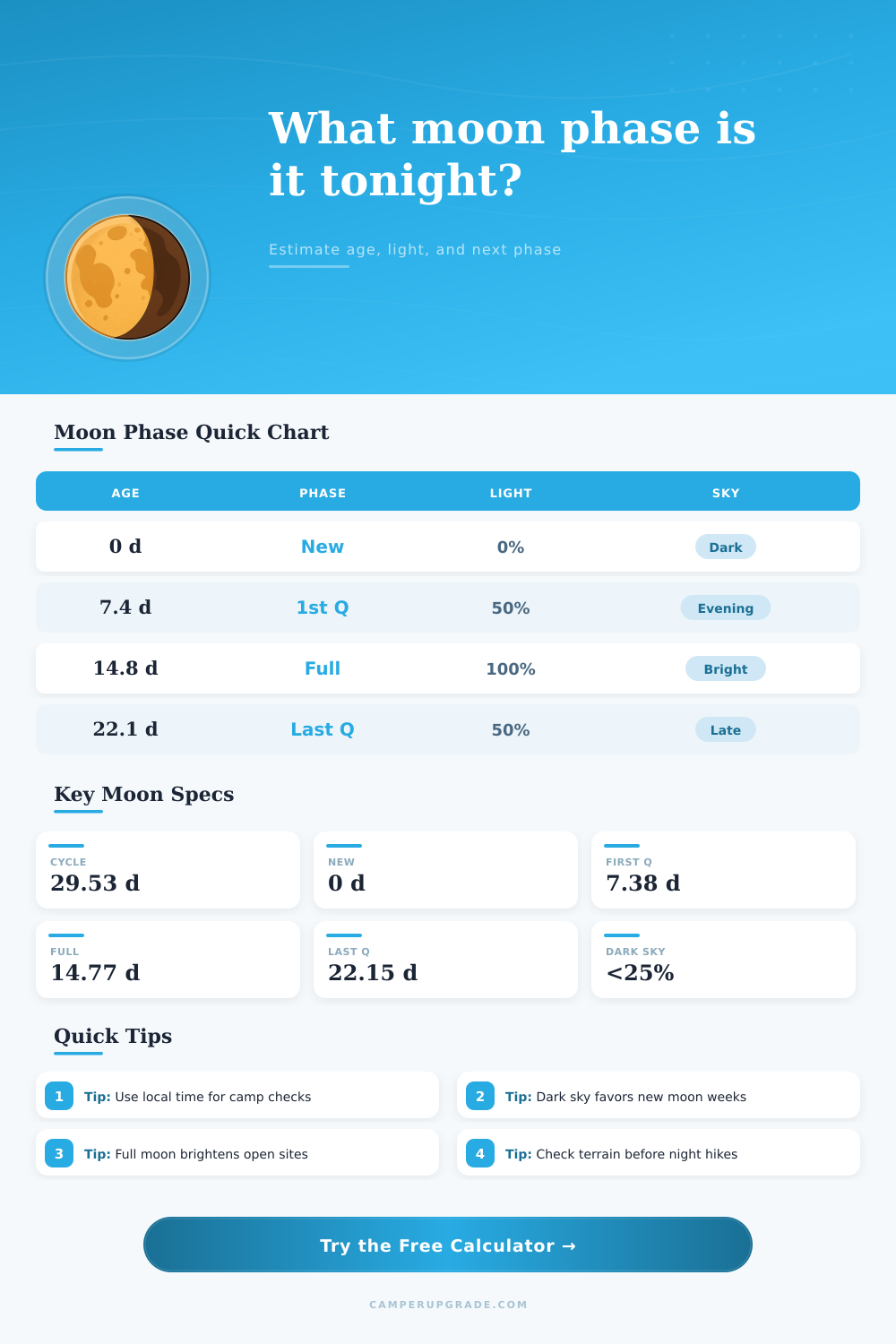
| New Moon | 0.0 days | 0% | Best dark-sky baseline |
| Waxing Crescent | 1 to 6 days | 1% to 49% | Thin evening moon after sunset |
| First Quarter | 7.4 days | About 50% | Useful evening light |
| Waxing Gibbous | 8 to 14 days | 51% to 99% | Increasing bright evening sky |
| Full Moon | 14.8 days | About 100% | Bright all-night moonlight |
| Waning Gibbous | 16 to 21 days | 99% to 51% | Bright late-night sky |
| Last Quarter | 22.1 days | About 50% | Best after midnight and dawn |
| Waning Crescent | 23 to 29 days | 49% to 1% | Predawn moon, darker evenings |
| Illumination band | Sky effect | Camp planning read | Best window |
|---|---|---|---|
| 0% to 10% | Very dark | Strongest stargazing baseline | Any moonless hours |
| 11% to 25% | Low light | Good dark-sky compromise | Evening or predawn |
| 26% to 50% | Moderate glow | Enough light for site movement | Quarter-side nights |
| 51% to 75% | Bright | Shadows and open-site visibility | Gibbous periods |
| 76% to 100% | Very bright | Useful natural light, weaker Milky Way | Full moon week |
| Longitude offset | Solar-time shift | Use when | Effect on phase |
|---|---|---|---|
| -15 degrees | -60 minutes | Far west side of zone | Slightly earlier local sky cue |
| -7.5 degrees | -30 minutes | Western half of zone | Small event timing nudge |
| 0 degrees | 0 minutes | Near zone meridian | Clock time used directly |
| +7.5 degrees | +30 minutes | Eastern half of zone | Small event timing nudge |
| +15 degrees | +60 minutes | Far east side of zone | Slightly later local sky cue |
| Preset | Threshold | Window | Planning emphasis |
|---|---|---|---|
| Dark-sky campsite | 25% | All night | Low moonlight for stars |
| Full moon walk | 75% | Dusk to midnight | High natural light |
| First-quarter setup | 50% | Dusk to midnight | Evening work light |
| Last-quarter dawn | 50% | Midnight to dawn | Late-night moonlight |
| Meteor watch window | 15% | Custom event | Low glare target |
| Southern hemisphere camp | 30% | All night | Flipped waxing display |
A moon phase calculator are a tool that will help you determine how much moonlight will be present during a specific time. The availability of moonlight can impact many activity that people perform at night, such as stargazing, hiking or searching for items at a campsite. The calculator allows individuals to determine the level of light that will be present during the moon phase by entering certain information into the calculator.
To use the calculator, an individual must enter specific information into the calculator. The individual must enter the local date and clock time into the calculator, as the position of the moon rise and sets according to a lunar calendar. Additionally, the individual must enter the timezone that the location is in, as this ensures that the moon phase calculator can account for the time that the individual inputs into the calculator.
How to Use a Moon Phase Calculator
Additionally, an individual can also enter the longitude offset for the location that they plan to visit. This may be necessary in the case of an individual camping at a location near the edge of a timezone; in these instances, the moon may rise or set at a different time then the location that is entered into the calculator. Finally, an individual can establish an illumination threshold for the individuals desired level of light at the location.
The calculator will provide several specific output in response to the entered information. The calculator will calculate the lunar age for the specific date that is entered. The calculator will also determine the name of the phase that the moon is in.
Next, the calculator can determine the illumination of the moon. The illumination will allow individuals to determine the brightness of the ground with the moons light. Finally, the calculator will determine the next major phase that the moon will reach during its 29.5 day cycle.
The observation window for the calculator can be set to specific times during the night, such as dusk to midnight, all night, or midnight to dawn. The observation window can help to ensure that the calculator accurately calculates the light that will be present during the activities that an individual plan to perform at the established location. For example, it is possible that during the first half of the night the moon will not be visible in the sky, but the moon may rise during the second half of the night.
In this case, the setting to adjust the observation window will allow the calculator to account for this possibility in its calculations regarding illumination of the moon. The moon phase calculator also provides reference table that provide information about the calculated data. One table provides information about how illumination impacts visibility of objects at night, as well as the adaptation of the eyes to darkness.
Another table provides information about how longitude offset may impact the local timing of the moon phases. The individual can use these tables to review the parameter that can impact the determined illumination of the moon prior to setting off to the trip. The moon phase calculator will provide an estimation of the illumination level at the location that is entered into the calculator.
However, the calculator cannot account for every variable in the location. For instance, the calculator cannot account for the terrain in the area; some locations may obstruct the view of the moon. Additionally, the calculator cannot account for the presence of clouds or the elevation of the location.
Thus, the calculator is only an estimation of the illumination of the moon at the location. For instance, if the calculator indicates that the illumination will be bright during the location that is entered, there is still the potential that the individual should of brought a headlamp to the area. However, if the calculator reveals that there will be no moonlight after midnight, the individual is less likely to need a headlamp.
Finally, the calculator can help the individual to prepare for various activities at the location. For instance, if the individual plans to view a meteor shower, it is likely that they will need very dark skies to view the meteor shower. If the individual is undertaking a night hike, they may want to ensure that there is some level of illumination at the location.
The illumination threshold allow them to account for these different goals for the area. Additionally, since the position of the moon changes each night, the calculator is especially helpful for individuals who are undertaking trips that will last for several day. For instance, if an individual is traveling to an area with a waxing crescent moon, it is possible that in a few days it will be a gibbous moon; knowing this, the calculator will allow them to plan around this change.