Backpack Weight Distribution Calculator
Balance dense gear, food, water, outside items, hip-belt load, and body-weight percentage for day hikes, overnights, rough trail, steep climbs, and long carries.
🎒Trail Load Presets
⚙Body Weight, Pack Load, Terrain, and Zone Inputs
Zone percentages are based on the entered zone weights. If zone weights do not equal total pack weight, the calculator scales the zone model and reports the mismatch in the breakdown.
🔢Weight Distribution Formula Cards
Load Ratio
pack / bodyTotal pack weight divided by body weight shows whether the carry is day-hike light, overnight normal, or heavy enough to slow balance.
Core Target
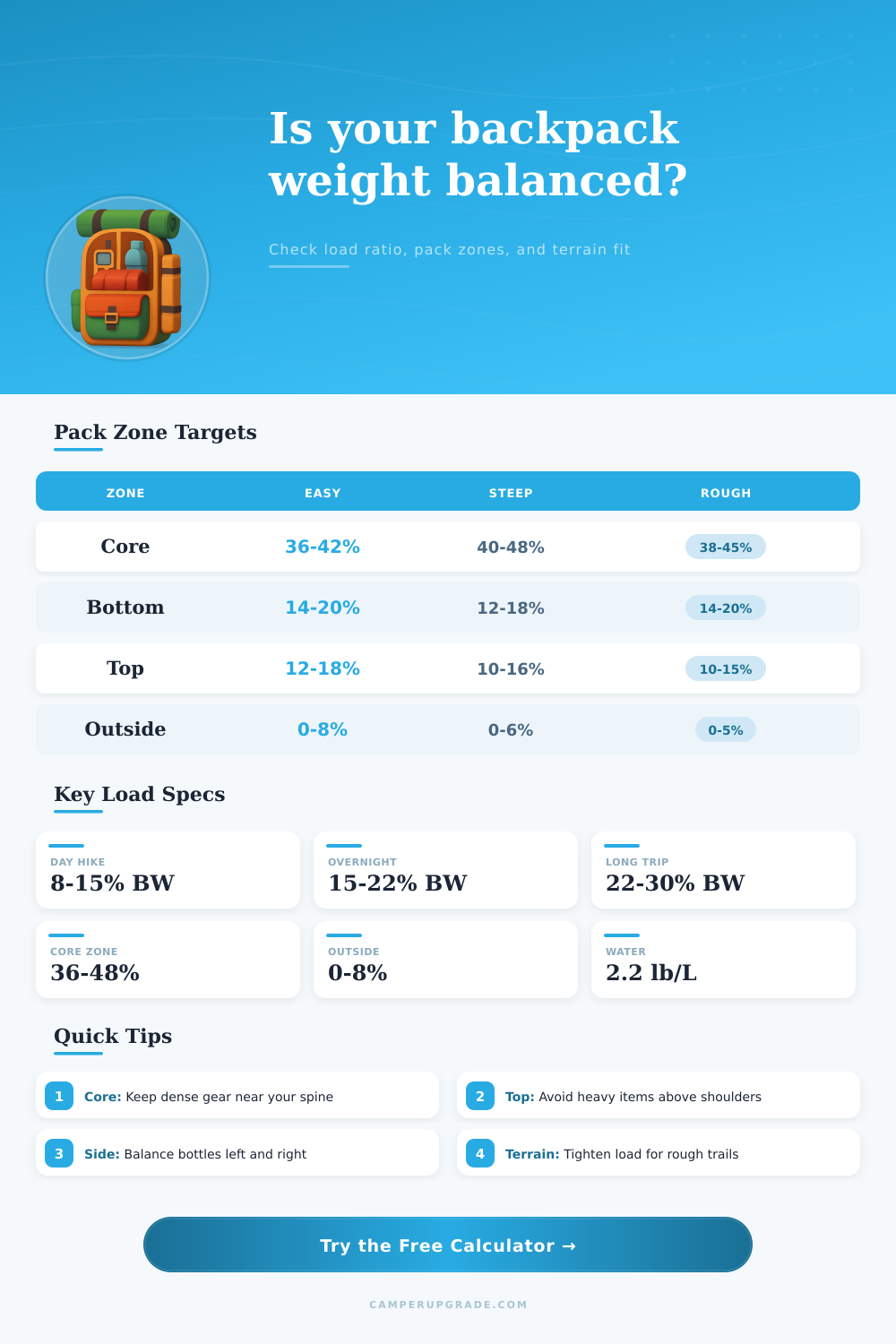
36-48%Dense gear should sit close to the spine and around shoulder-blade to mid-back height, especially on steep or rough terrain.
Outside Penalty
front + sideWeight far from the spine creates sway. Rough ground and fast movement reduce the acceptable outside pocket share.
Comfort Modifier
frame + beltFrame support and hip-belt transfer adjust the comfort threshold, but poor distribution can still make a moderate pack feel heavy.
📦Gear-Zone Spec Grid
📋Backpack Distribution Tables
| Pack Zone | Target Share | Best Gear | Balance Risk |
|---|---|---|---|
| Core near spine | 36-46% | Food, cook kit, water bladder | Too low feels saggy |
| Bottom compartment | 14-22% | Quilt, sleeping bag, pad | Dense items pull backward |
| Top and lid | 10-18% | Rain shell, snacks, first aid | Heavy top raises sway |
| Front pocket | 0-8% | Wet tarp, sandals, filter | Far weight leans back |
| Side pockets | 6-18% | Bottles, poles, tent body | Uneven sides twist hips |
| Hip and straps | 0-6% | Phone, snacks, compass | Bulky pockets affect stride |
| Terrain | Core Goal | Top Limit | Outside Limit |
|---|---|---|---|
| Smooth trail | 34-42% | 18% | 10% |
| Rolling trail | 36-44% | 17% | 8% |
| Steep climbs | 40-48% | 15% | 6% |
| Rough trail | 38-46% | 14% | 5% |
| Snow or talus | 40-48% | 13% | 5% |
| Fastpacking | 42-50% | 12% | 4% |
| Load Ratio | Typical Use | Pack Feel | Distribution Priority |
|---|---|---|---|
| Under 10% | Short day hike | Light | Access matters most |
| 10-15% | Long day hike | Easy to moderate | Balance bottles |
| 15-22% | Overnight or weekend | Normal backpacking | Build a dense core |
| 22-28% | Multi-day carry | Heavy | Move mass close |
| 28-35% | Remote food or water | Very heavy | Reduce sway first |
| Over 35% | Expedition-style load | Strenuous | Recheck total load |
| Scenario | Total Load | Core Weight | Outside Weight |
|---|---|---|---|
| Day photo hike | 16 lb | 6-8 lb | 1-2 lb |
| Weekend trail | 26 lb | 10-12 lb | 1-3 lb |
| Bear canister | 34 lb | 14-17 lb | 1-2 lb |
| Desert water | 38 lb | 16-20 lb | 1-3 lb |
| Winter overnight | 42 lb | 15-19 lb | 2-4 lb |
| Fastpack kit | 13 lb | 6-7 lb | 0-1 lb |
💡Pack Balance Tips
This calculator estimates load balance from pack-zone weights. Fit, torso length, injury history, footwear, and route conditions can change what feels comfortable on trail.
A weight distribution tools is a calculator that allows individuals to understand how the weight that they have within their backpack is distribute in relation to there spine and there center of gravity. While many individual who backpack may believe that the total weight of the backpack is the only that matters in terms of creating discomfort, the placement of the item within the backpack is actualy more important. If the weight within the backpack is placed in zone that are too high or too far from the individual’s spine, their backpack may become uncomfortable to walk in due to the way that the backpack may pull against there body.
A weight distribution tool calculates the placement of the backpack’s items to allow individuals to make better decisions regarding the placement of their items within their backpack. To utilize such a weight distribution tool, an individual must provide the tool with several different inputs. The first of these is the individual’s body weight, the total weight of the backpack, and the weight of the items within several different zone of the backpack.
Balance Your Backpack with a Weight Tool
The zones of the backpack that may be weighted include the core zone (items like food, water bladders, and stoves), the bottom zone (items like sleeping bags and sleeping pads), the top zone (items like rain shells and snacks), and the side and front pocket zone (items like trekking poles or water bottles). Because items within the side and front pockets are placed far from the spine of the individual, these items can cause the individual to sway within their step. The weight distribution tool compares the weight of each of the zone’s item to target weights.
These target weights are provided for different types of terrain that the individual will be walking on. For instance, rough terrain may cause outside (pocket) items to be more difficult to manage compared to smooth terrain. The stability score that the weight distribution tool produces will indicate whether or not the individual will have a comfortable stride with their current backpack, or if their backpack will fight against their movement.
If the stability score is low, the tool will indicate to the individual the shift in weight that the individual will require within a specific zone of their backpack to even improve that stability score. The individual’s body weight must be provided to the tool. For instance, a twenty-eight pound backpack may be a small percentage of the body weight of a one-hundred sixty pound individual, but may be a higher percentage of the body weight of a two-hundred pound individual.
Thus, the tool will calculate the body weight of the individual to determine if the backpack is thought to be light, normal, or heavy for that individual. Additionally, the weight distribution tool will take their frame type and their hip-belt transfer into consideration. The transfer of weight to the hips through the belt will allow for better distribution of the backpack’s weight, especially if the individual has a stiff frame that can effectively transfer that weight to there body.
The individual will have to provide the volume of the water that they will be carrying as one of the separate inputs of the backpack’s weight. Water is heavy, and the weight of the water will move within their backpack as they drink from the water bottles. Two liter of water will weigh approximately four and a half pound.
Additionally, if the individual places the water within their side or front pockets, and if they drink from one side of the backpack more than the other, their backpack may become unbalance. Thus, the tool will flag the water share percentage, which will allow individuals to decide if they will utilize the side or front pockets for their water bottles, or if they should place their water within the core zone of their backpack to maintain that balance. Weight distribution tools often weight the individual’s items to ensure accuracy in the tool.
Many individual will not be able to weigh every single item that is within their backpack. Thus, the weight distribution tool will calculate the percentage of each zone in comparison to the total weight of the backpack to ensure accuracy in the tool. Additionally, the individual does not have to have exact weight of each item within the backpack, as the weight distribution tool will account for inaccuracies when calculating the individual’s stability score.
The weight distribution tool may have presets that are provided for individual types of backpacking trips. For instance, individual trips may include fastpacking, bear-canister carrying, or desert water hauling trips. Each of these trip type have different weight distributions that may be pre-loaded into the tool.
These presets will not be rule for the individual backpackers, but they will provide a general example of the effects that different type of terrain can have on their stability score. Some of the most common mistake in backpacking can be the placement of items within the top zone and the side pockets of a backpack. For instance, many individuals may place heavy items within the top zone for convenience, but this can cause the backpack to pull against the individual’s body when they are walking downhill.
Additionally, many individuals may place heavy items within their side pockets for the same reason. However, this will create a twist within their body that their hip belt will not be able to compensate for. These errors will become more obvious if an individual utilizes such a weight distribution tool to calculate their backpacking.
Additionally, the tool can correct an individual’s error. A weight distribution tool will not replace the need for individual with a backpack to actually walk on the trail with their backpack. Their previous injury, their frame, their torso length will all impact the way in which they feel with their backpack.
However, such a tool will remove the guesswork that individuals have to utilize when adding items to their backpack. A low stability score indicates that a backpack need to be adjusted. For instance, if an individual’s stability score is low, they can change the placement of an item within their backpack, or the split the weight of an item like water bottles.
Thus, a weight distribution tool allow individuals to make better decisions as to where to place items in their backpack, which allows for them to adjust their backpack effectively on the trail itself.