Portable Solar Charge Calculator
Estimate battery charge time, daily solar harvest, device recharges, and power surplus or deficit from portable panel watts, real sun hours, shade, angle, controller efficiency, temperature loss, and reserve.
Portable solar estimate
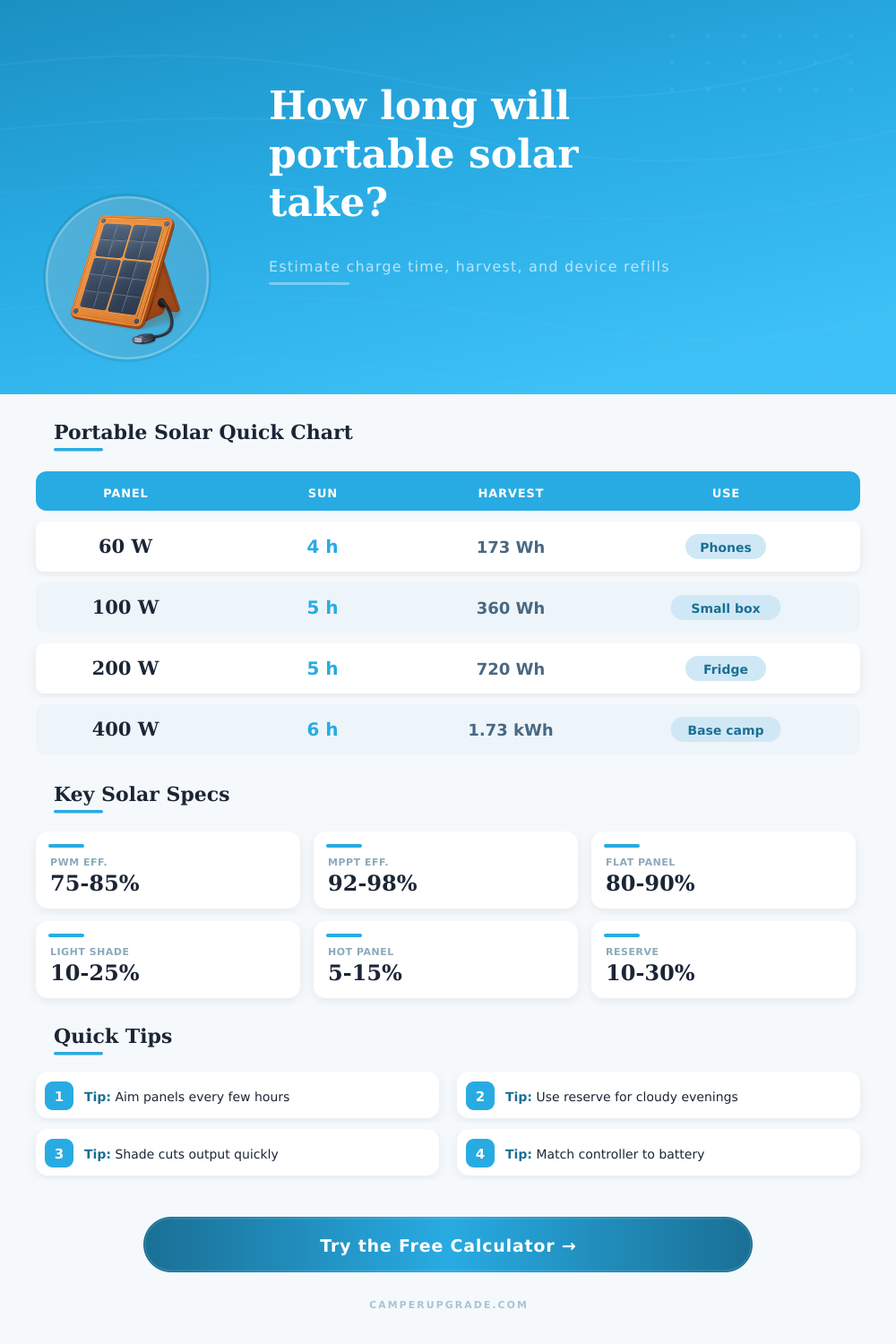
| Panel setup | 3 peak sun hours | 5 peak sun hours | 6 peak sun hours |
|---|---|---|---|
| 28 W USB foldout | 60 Wh after losses | 101 Wh after losses | 121 Wh after losses |
| 60 W backpack panel | 130 Wh after losses | 216 Wh after losses | 259 Wh after losses |
| 100 W folding panel | 216 Wh after losses | 360 Wh after losses | 432 Wh after losses |
| 160 W suitcase panel | 346 Wh after losses | 576 Wh after losses | 691 Wh after losses |
| 200 W briefcase kit | 432 Wh after losses | 720 Wh after losses | 864 Wh after losses |
| 400 W base camp array | 864 Wh after losses | 1,440 Wh after losses | 1,728 Wh after losses |
| Panel position | Planning factor | Typical use | Calculator setting |
|---|---|---|---|
| Well aimed at sun | 100% | Panel moved to face sun during the day | Well aimed at sun |
| Adjusted a few times | 93% | Morning, midday, and afternoon aim changes | Adjusted a few times |
| Flat on ground or roof | 86% | Convenient but less direct sunlight | Flat on ground or roof |
| Wrong angle much of day | 75% | Panel placed once and left off-axis | Wrong angle much of day |
| Vertical or poor aim | 62% | Hanging panel, winter low sun, or blocked campsite | Vertical / poor aim |
| Condition | Shade input | Output note | When to use |
|---|---|---|---|
| Clear open site | 0-5% | Near normal output after angle and heat | Beach, desert, open meadow, clear boat deck |
| Light branch shade | 10-20% | Noticeable drop from moving shadows | Open campsite with scattered trees |
| Partial shade | 25-45% | Daily harvest can fall by a third or more | Forest edge, vehicle shadow, awning edge |
| Heavy shade | 50-75% | Charging becomes slow and unpredictable | Dense trees or short sun window |
| Mostly shaded | 80-95% | Use solar only as backup trickle input | Deep woods, canyon, stormy site |
| Device or load | Typical energy | Planning example | Notes |
|---|---|---|---|
| Phone recharge | 12-18 Wh | Use 15 Wh per phone | Large phones and inefficient cables can use more |
| Camera battery | 10-18 Wh | Use 15 Wh per pack | Cold weather reduces usable camera runtime |
| Drone battery | 40-90 Wh | Use 60 Wh per flight pack | Check the label for exact watt-hours |
| Laptop session | 45-100 Wh | Use 70 Wh per working session | USB-C conversion losses are often included in draw |
| LED camp lights | 20-60 Wh | Use 40 Wh per night | Multiply watts by hours used |
| 12 V fridge day | 250-600 Wh | Use 450 Wh per warm day | Ambient heat and openings change daily draw |
| Battery class | Capacity band | Usable at 20% reserve | Best portable match |
|---|---|---|---|
| Phone bank | 20-100 Wh | 16-80 Wh usable | 10-60 W foldout panel |
| Mini power station | 150-300 Wh | 120-240 Wh usable | 60-100 W folding panel |
| Weekend power station | 500-800 Wh | 400-640 Wh usable | 100-200 W suitcase panel |
| Fridge station | 900-1,200 Wh | 720-960 Wh usable | 200-300 W portable array |
| Base camp battery | 1,500-2,100 Wh | 1.2-1.7 kWh usable | 300-400 W folding array |
| Large modular kit | 2,400+ Wh | 1.9+ kWh usable | 400 W or larger portable input |
Portable solar power require careful planning to account for the fact that the energy produced by a solar panel is often less than the energy rating printed on the solar panel. The factors that reduce the energy produced by a solar panel include heat, angle of the panel, and shade falling on the solar panel. These factors can be entered into a solar panel calculator to determine the amount of energy that the panel will produce.
The first step in using a solar panel calculator is to enter the wattage of the solar panel that youll use. The wattage of a solar panel is the amount of energy that it is rated to produce, but it wont reach that amount each day due to the various factor that contribute to the reduction of the panels energy output. The calculator will calculate the effective wattage of the panel accounting for these various factors.
How to Use a Solar Panel Calculator
Multiplying the effective wattage by the number of peak sun hours that will be available during the planning period will determine the daily harvest that the solar panel will produce. The second step in using the calculator is to enter the capacity of the battery that will be used to store the energy produced by the solar panel. Most power stations indicates the watt-hour figure of their batteries.
This watt-hour figure should be entered into the calculator. In addition to the watt-hour figure, the user will need to enter the battery reserve into the calculator. A battery reserve allows for the battery to contain some energy even when the solar panel isnt producing any energy; this energy can be used in emergencies or overnight when the solar panel is not capturing energy from the sun.
The third step is to enter the angle of the solar panel and the shade that will fall on the solar panel. Solar panels produce the most energy when they are flat, but will produce less energy if they are positioned at an angle. Shade falling on the solar panel will also reduce the energy that the panel produces.
Entering these factors into the calculator will allow for the calculation to create an accurate estimate of the energy that the solar panel will produce. The fourth step is to calculate the amount of energy that the device will use that will be powered by the solar panel. Each device that is to be powered by the solar panel will have a certain amount of energy that is required to recharge the device.
The watt-hours that are required to fully recharge each device, as well as the number of times that the device will be recharged each day, can be entered into the calculator. The calculator will display how many times each device will be able to be recharged each day based off the amount of energy that will be harvested from the solar panel. If the amount of energy that the solar panel will produce is not enough to fully recharge the devices that is to be powered by the solar panel, then the size of the solar panel may need to be increased, or the number of times that the devices are to be recharged may need to be decreased.
Another factor to consider is the effect that temperature will have upon the solar panel. The hotter the solar panel becomes, the less energy it will produce. The derate field on the calculator allows for the user to enter the effect that heat will have upon energy production by the solar panel.
Using this field allows the user to account for the energy that will be lost due to heating of the solar panel to high temperatures. The solar panel calculator will produce several different outputs after the user enters the information about the solar panel, battery, and devices. The charge time will indicate how long the solar panel will take to charge the battery.
The daily harvest will indicate the number of watt-hours that the solar panel will produce each day. The devices that will be recharged can be determined from the daily harvest amount. Finally, a line that indicates the balance of the energy calculations will subtract the amount of energy that the devices will use from the daily harvest; if this line produces a surplus of energy, the system has more energy than it needs, but if it indicates a deficit, then there isnt enough energy for the devices to be fully powered.
Using a solar panel calculator will allow the user to determine the energy budget of the solar panel system. The modest-sized solar panel will often produce more energy than a large solar panel with poor positioning. The calculator will provide the user with an realistic amount of energy that the solar panel will produce each day, rather than an optimistic estimate.
If the user knows the amount of energy that the solar panel will produce each day, and the amount of energy that the devices to be powered will use, then the user can determine if the solar panel system is large enough to supply the devices with the energy that they require.