🌠 Star Trail Exposure Calculator
Dial in exposure length, trail density, and stacking rhythm for smooth star arcs
| Lens | Arcsec/Px | 24px Exp | Trail/min |
|---|---|---|---|
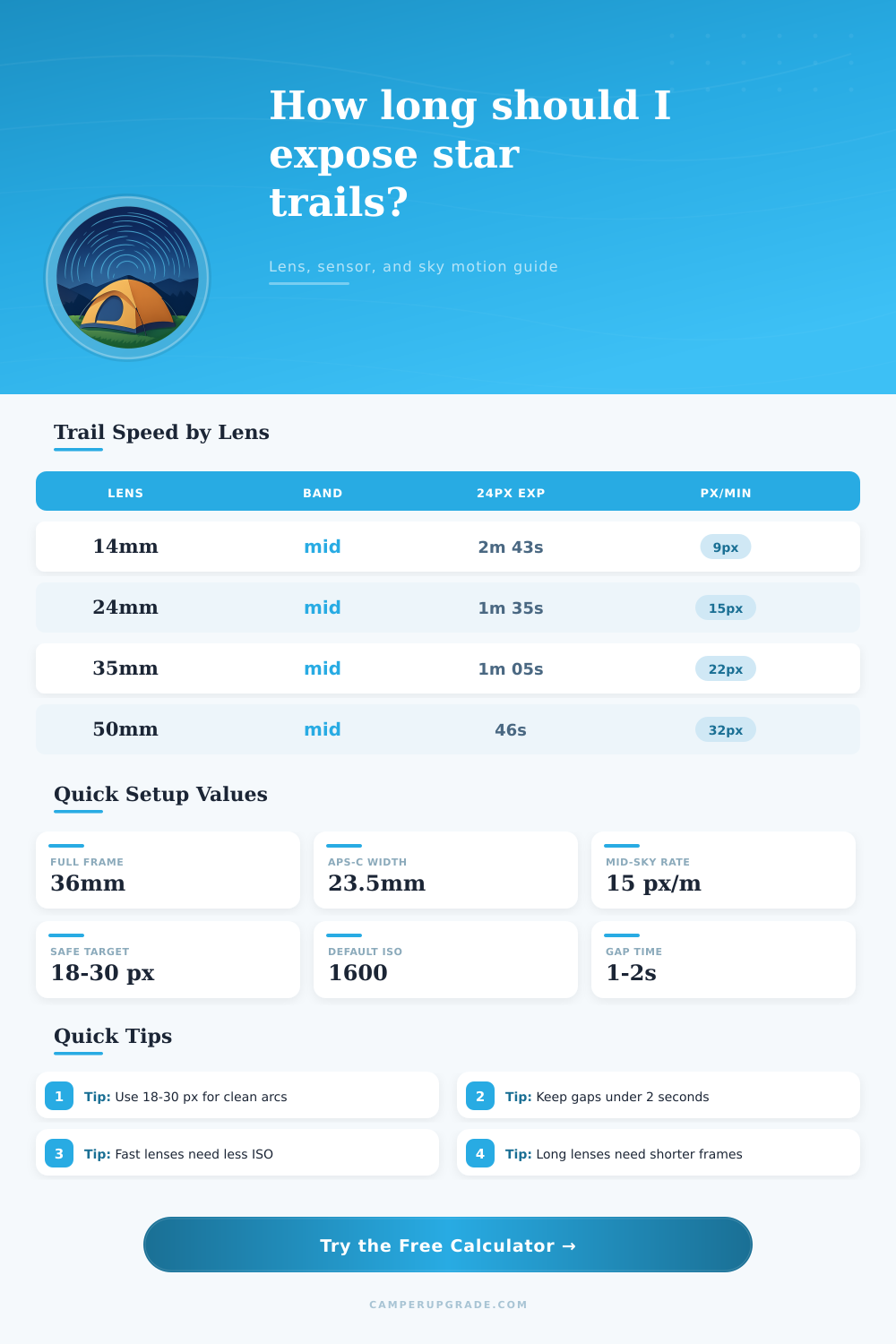
| 14mm | 88.4 | 2m 43s | 9 px |
| 24mm | 51.6 | 1m 35s | 15 px |
| 35mm | 35.4 | 1m 05s | 22 px |
| 50mm | 24.8 | 46s | 32 px |
| Band | Factor | 24mm Exp | Trail/min |
|---|---|---|---|
| Polar ring | 0.25 | 5m 29s | 4 px |
| Near pole | 0.50 | 2m 45s | 9 px |
| Mid-sky | 0.87 | 1m 35s | 15 px |
| Celestial eq | 1.00 | 1m 22s | 18 px |
| Target | Look | Use | Notes |
|---|---|---|---|
| 12 px | Pin clean | Very wide | Subtle drift |
| 18 px | Short arc | General | Balanced |
| 24 px | Clear arc | Most shots | Safe default |
| 36 px | Big swirl | Dramatic | Long stack |
| Index | Look | ISO / Aperture | Best Use |
|---|---|---|---|
| 0.5-0.9 | Dim | f/4 ISO800 | Clean skies |
| 1.0-1.5 | Balanced | f/2.8 ISO800 | Default |
| 1.6-2.5 | Bright | f/2.8 ISO1600 | Bold arcs |
| 2.6+ | Hot | f/2 ISO3200 | Fast stacks |
To capture the trails of the stars, you must understand the movement of the stars and your gear. The Earth rotate at a constant speed. As the Earth rotates, the stars appears to move in arcs across the night sky.
Your camera gear must be set to match the speed of the stars. The trail length of the stars in your image will be visible per frame. If the trail length is too short, your image will have dashed lines.
How to Take Star Trail Photos
If the trail length is too long, the images will be blurred. Many photographer aim for 18 to 30 pixels per trail length. Your sensor size will affect the trail length.
Full frame sensors are 36 millimeters while cropped sensors like APS-C sensors are 23.5 millimeters. The cropped sensor have more pixels per square millimeter so there will be more movement of the stars within the same number of pixels. The focal length of your lens will also affect the movement of the stars per pixel.
A 14mm lens will allow for longer exposures of the stars because the stars will travel more slow across the pixels of your sensor. A 50mm lens will create shorter exposures of the stars because the stars will travel more quickly across the pixels. You will have to adjust your exposure time according to your focal length.
Aperture and ISO will impact the brightness of your stars. Using an aperture of f/2.8 and an ISO of 1600 will create a balanced brightness index for your stars. The balanced brightness index will allow your trails to be seen without creating bright spots in your image.
Finally, the position of the stars will also impact the movement of the stars. The stars near the celestial pole will travel slowly so long exposures can be used. The stars near the celestial equator will travel quickly so short exposures should be used.
If these variable are not accounted for the trail length will be too long for some parts of the sky and too dim for others. The rhythm of your session will impact your trail length. The gaps between your exposures should be under two seconds.
For long exposures, such as 90 minutes of exposure time, your active exposure should be 80 to 90% of your total time. The total length of the trail will be measured in pixels and indicate the rotation of the degrees of the sky over time. Presets can make setting up your camera and lens easier.
The presets will account for your sensor type and lens type. However, environmental factor can change your results. Areas that are more light-polluted will require a lower ISO setting for your images.
Areas that may be shaken by the wind or contain dew on the lens will also create issues with the quality of your images. Therefore, you should use a single test frame to evaluate the length of your trail on your histogram. Some of the mistakes that people will make when taking star trail photos include using an ISO that is too high, such as ISO 6400.
Such a high ISO will introduce noise that the software will amplify. Another mistake is ignoring the position of the stars in the sky. The trails will be too long for those areas where the stars move slowly.
To fix these issues people can start with shorter trails and adjust the length once they are familiar with their equipment and the area where they plan to take there photos. You can use software like StarStaX or Sequator to take the frames and make star trails with the software. These programs will align the frames automatically so that there are no gaps between the exposures.
Finally, the foreground of your image can contain objects like a tent or building that will allow for the stars to line up to the objects. Your celestial pole should be off-center in your camera viewfinder if you would like to create spiral trails from the stars. Battery life will also become an issue during these long exposures, especially if you are taking them in cold weather.
You should also consider in-camera noise reduction but remember that using this will double your exposure time. Additionally, you must balance the motion of the stars in your exposure with the amount of light in your scene to create succesful trails of the stars.